The short answer
We're building a retail platform: a point-of-sale system for the cashier, an accounting system and a manager's dashboard in the browser, and a central hub that syncs data between them. The POS works without internet and prints receipts offline, and when there's a connection, it syncs with the central hub every 20 seconds: a new price reaches the cashier's screen in under a minute, and a receipt reaches the accounting system within seconds. The accounting system already handles products, purchases, money, debts, currencies, reports, and month-end closing; the FIFO cost calculation has been checked against every sale for the current year and differs from 1C's calculation by less than a hundredth of a percent.
Main takeaway: for a simple retail process, ready-made systems either require a server — without which the POS simply stops working — or don't support Ukrainian fiscal compliance, or are far heavier than the task requires. Building a narrow engine tailored to a specific process turned out cheaper and more reliable than dragging along a large ERP system just for one screen. A full switchover running side by side with a live 1C setup hasn't happened yet — that's the next step, and the choice of software fiscal register provider for the pilot hasn't been locked in yet.
In this article
- Why we're building our own POS instead of using a ready-made one
- What the cashier's screen looks like
- Returns and the price floor
- Closing a shift
- What the accounting system can do
- How data is migrated from 1C and why the POS works without internet
- What went wrong
- What already works, what's in progress, and takeaways
- Frequently asked questions
Why we're building our own POS instead of using a ready-made one
The starting point is a real coffee and tea shop where the cashier's POS was built on top of 1C. The task sounded simple: remove the dependency on 1C, keep the cashier's familiar workflow, and add proper accounting for the manager. Before writing anything from scratch, we checked several ready-made open-source retail systems and a few commercial desktop POS solutions.
The verdict: every solution failed on one of three points — either the POS doesn't work without a constant connection to a server, or syncing between the POS and accounting is only available in a paid tier or missing entirely, or there's no ready-made integration with a Ukrainian software fiscal register. And the actual process in a small store is simple: one warehouse, one payment type, sales and occasional returns. Dragging in a heavyweight system for that seemed unreasonable.
| Type of ready-made solution | Strength | Why it didn't fit |
|---|---|---|
| Open-source POS systems for cafes and small venues | Offline mode, simple setup | Built around a "table — kitchen" format, no syncing with a separate accounting hub |
| Large ERP systems with a POS module | Maturity, large community, ready-made reports | The POS doesn't work without the ERP server; reworking the screen for a familiar process means reworking the entire module |
| Desktop POS systems with cloud sync | Convenient interface, familiar look | Syncing between POS terminals and the central accounting system is only in the paid plan or an early, unstable version |
None of the fiscal-compliance libraries we checked exist in open source at all — a software fiscal register module has to be written from scratch regardless of language. That became the final argument: since we have to write fiscal compliance ourselves anyway, it makes sense to also build the POS itself so it precisely matches the real-world process, rather than forcing the process to fit someone else's logic.
What the cashier's screen looks like
The core principle: the seller shouldn't notice any difference. The receipt is on the left, product categories and items as tiles on the right, and payment is a single button. We kept the same hotkeys that existed in the old 1C-based POS: void a receipt, return by receipt number, open and close a shift. There was no need to retrain anyone — people just kept working with the same motions.
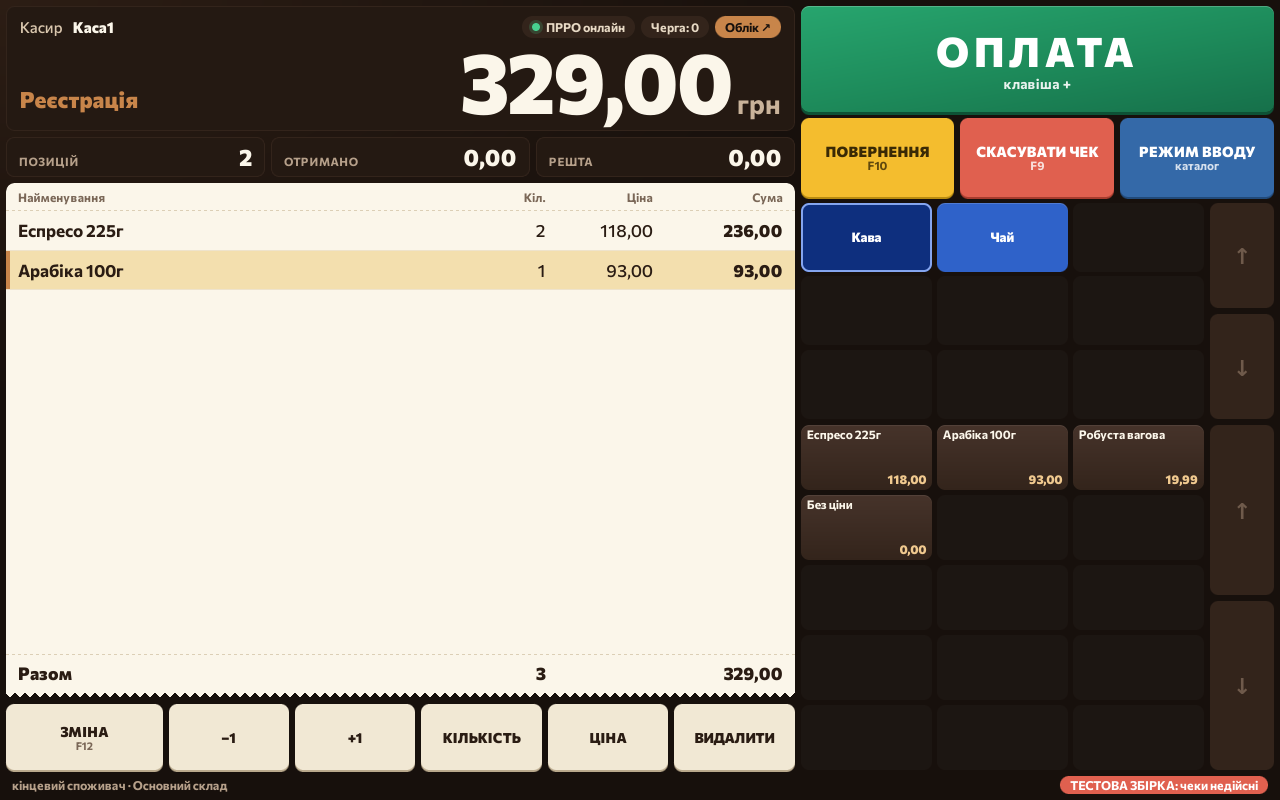
The receipt number only appears after payment, so there are no gaps in numbering from canceled attempts. The receipt prints immediately; if the receipt printer doesn't respond, the sale is already saved, and the POS simply offers to print again without creating a duplicate document.
Returns and the price floor
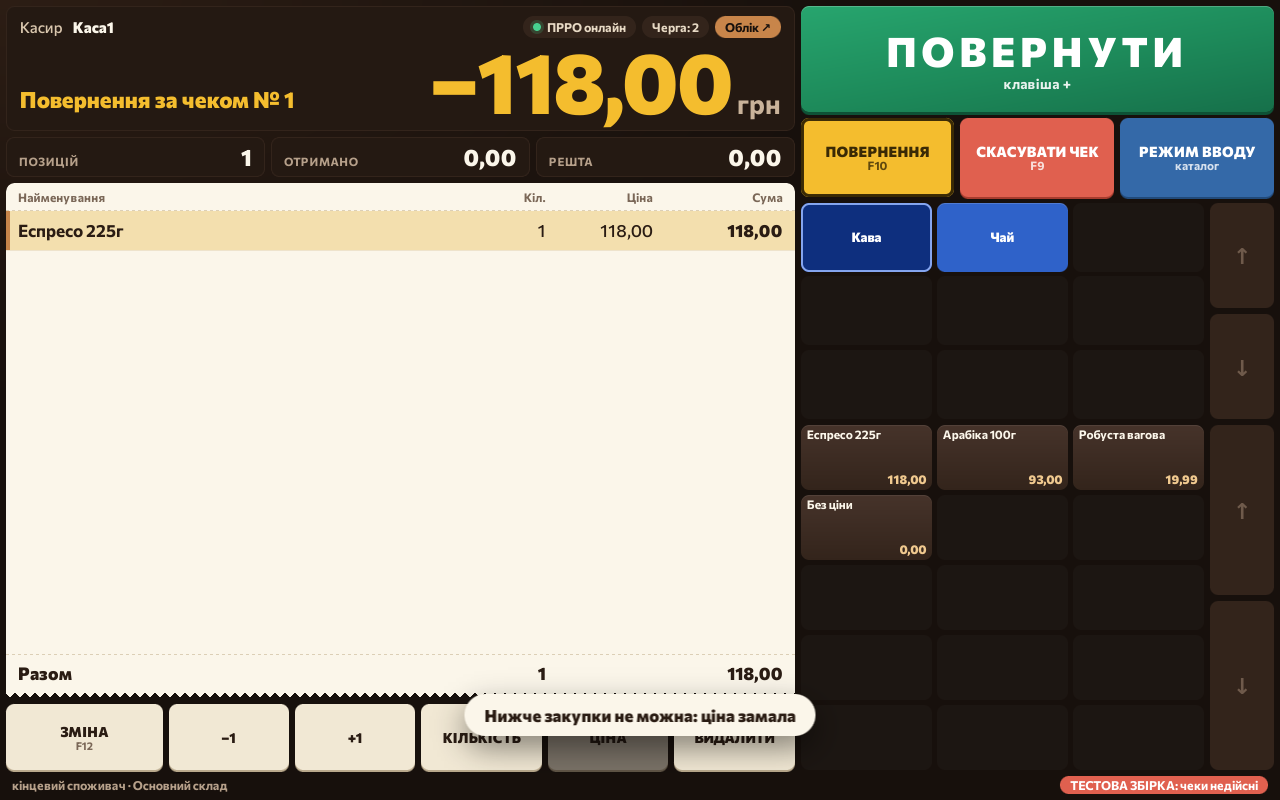
Returns are processed by the sale's receipt number, and the POS won't allow a return larger than what was actually sold on that receipt. We carried over a second important rule from 1C exactly as it was: the cashier can't manually set a price lower than the last purchase price. It's a simple rule, but it protects the margin from a "wrong button" mistake — while price-list prices always go through without restriction.
Closing a shift
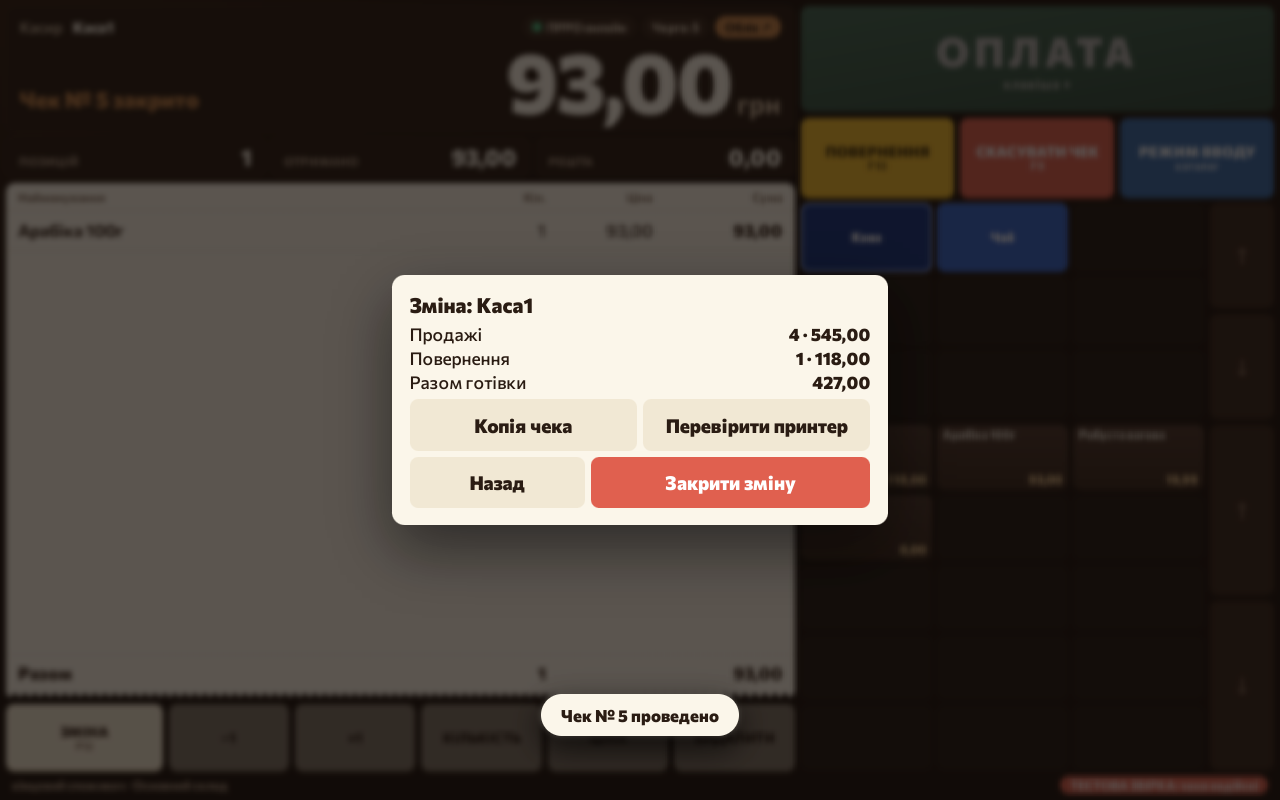
At the end of a shift, the cashier's register has to come out to exactly zero: sales and returns are reconciled against the cash in the drawer, and any difference — a shortfall or surplus — is recorded as a separate document instead of being hidden. This is exactly the gap the old accounting system had: the manager's dashboard only showed "sales minus purchases," with no expenses and no visible cash discrepancies.
What the accounting system can do
The accounting system opens directly in the browser at a separate address, with nothing to install on the manager's computer. Here's what already works:
- Products and prices — categories, archiving instead of deletion (so old receipts and incoming stock don't break), price changes either line-by-line or in bulk across a category, an immutable price history with author and timestamp.
- Purchases — receiving stock and paying a supplier in a single form, the new sale price is entered right in the receiving line, and the last purchase price automatically becomes the floor for manual pricing at the register.
- Money — cash registers with balances per the books, day-end closing with a cash recount, expenses by category, supplier payments, cash deposits and transfers between registers, a cash book for any period.
- Debts — who owes whom and how much, per supplier and combined across active currencies.
- Currencies — hryvnia, dollar, euro; the daily exchange rate is pulled automatically once a day, incoming stock can be recorded in the supplier's currency, and payments can be settled in any currency at the current rate.
- Reports — sales by day, product, category, cashier, and register; stock movement; balances as of a date; sales below purchase price or below the price list; exchange-rate differences on currency-denominated debts.
- Month-end closing — the period "freezes," cost calculations in closed days are no longer recalculated, and database backups run every night and are immediately verified by restoring them to a separate database.
How data is migrated from 1C and why the POS works without internet
Data is sourced from a copy of the 1C database: categories, products with units of measure, current prices, suppliers, registers, and employees. Opening balances are migrated as of a specific date, quantities are verified down to the unit, and value is taken from 1C's batch data. We ran the FIFO cost calculation against every sale for the current year and compared it with 1C's calculation — the discrepancy came out to +0.006%. Where a discrepancy does exist, the cause lies in 1C itself: it occasionally wrote off batches out of date order or sold more than was actually available in the batches.
Staff didn't have to relearn anything — the screen, product tiles, and hotkeys were kept the same as in the old 1C-based POS; what changed is what runs under the hood.
Offline operation is one of the key requirements. The POS keeps a local database right on the device: catalog, prices, receipt queue. Sales and receipt printing happen without any outgoing requests. When there's a connection, syncing with the central hub happens every 20 seconds: receipts go up, and each one lands in the accounting system exactly once, while price and product changes come down — a new price appears on the cashier's screen in under a minute. If there's no connection, receipts wait in the queue and get sent automatically as soon as the network is back.
The POS works with a software fiscal register — the fiscal-compliance module connects as a separate step without changing the sales logic itself.
What went wrong
A few things had to be reworked already during operation:
- The old, simple web server kept connections open with no time limit — several slow connections at once could hang the entire sync service. We rewrote it so every request has a hard timeout; otherwise it's simply dropped.
- When a POS terminal is reinstalled with an old access key, a new receipt with the same document number wasn't caught by the standard duplicate check in the database — it only reacts to a repeated identifier, not a repeated number. We had to add a separate check so such a receipt isn't silently lost but instead lands in a conflict list for a person to review.
- In the first version, the cost calculation didn't account for cases where 1C had sales with no matching batch receipt — we had to add an estimate based on the last purchase price for the period before the actual receipt exists, plus an automatic recalculation once the receipt appears.
- We couldn't fully recover the price history from 1C: the price list there had sometimes been re-posted retroactively, so old price changes overwrote each other. The solution was to start an immutable price history from the moment of migration rather than trying to reconstruct the past.
If you're planning a similar migration: budget time specifically for reconciling calculations against the old system, not for the POS interface itself — that's where most of the surprises turned up.
What already works, what's in progress, and takeaways
Already built and verified: sales, returns, shift closing, price floor at the register; the offline receipt queue with syncing; all the accounting features listed above — products, purchases, money, debts, currencies, reports, month-end closing; daily backups with restore verification.
Still in progress: the final choice of software fiscal register provider for the pilot; linking service operations at the register itself (cash withdrawal) with day-end closing in the accounting system; handling returns for receipts issued back in 1C before the switch; testing the POS application itself on older computers running legacy Windows. And most importantly — a full parallel pilot running alongside a live 1C setup is still ahead: everything listed above has been verified against a copy of the data, not against live sales traffic.
Takeaways you can apply yourself:
- Before switching accounting systems, look at which parts are actually being used — often half the features are outdated and not worth migrating.
- For a narrow, simple process, it's cheaper and more reliable to build a small dedicated tool than to force a large ready-made system to fit.
- Offline mode for a retail POS isn't a luxury — it's a requirement: connectivity in a store drops regularly, and sales shouldn't stop because of it.
- An immutable document history and corrections via reversal entries, rather than retroactive edits, cost little at the design stage but save you from "silent" accounting discrepancies later.
Frequently asked questions
Will cashiers need to be retrained for the new POS?
No, that was a specific requirement. The screen, the tile-based product layout, and hotkeys were copied from the previous 1C-based POS — what changed is the internal logic, not the cashier's familiar workflow.
What happens if the store loses internet access?
The POS keeps selling and printing receipts — everything needed for a sale lives on the device itself. Receipts pile up in a queue and automatically sync to the accounting system once the connection returns, each one exactly once.
How does this align with fiscal compliance and the software fiscal register?
The POS works with a software fiscal register — the fiscal-compliance module connects as a separate step in the sales process. The choice of a specific provider for the full pilot hasn't been locked in yet.
How accurate is the new system's cost calculation compared to 1C?
We checked the FIFO calculation against every sale for the current year and got a discrepancy of +0.006% versus 1C. The remaining small deviations are explained by 1C occasionally writing off batches out of date order.
Can you migrate partially, keeping some processes in 1C?
Yes, that's exactly what's happening now: data is regularly migrated from a copy of the 1C database, and the new POS and accounting system run in parallel at a real coffee and tea shop. A full switchover without 1C is the next stage after the pilot.
Want to see the POS and accounting system running on your own data?
Leave a request — we'll show you the platform using an export from your 1C or BAS and give you access among the first users.
Discuss a project